AUDIO WORKSHOP

DIY audio blog for projects, schematics, PCB's, designs, electronics, mods

AUDIO_WORKSHOP

TPA6120 Headphone Amplifier – COMPOSITE TOPOLOGY

Yet another TAP6120 based headphone amplifier you’d say. Well maybe you are right. This one started as a group project involving myself and few other guys forum mates. So here it is – the UBIQUITOUS TPA6120 amp.
The TPA6120 chip is a rather strange beast. Looking at the TI’s portfolio of headphone amplifiers you would not find any other amp similar to this. Especially if you look at the slew rate. So why is that? The answer is rather simple. The TPA6120 chip is actually a re-branded high speed line driver that had failed to meet the requirements. This is a common practice among the manufacturers. Many so called “audio opamps” are actually the same thing – lower grade opamps that had failed to meet the criteria.

However failing to comply with the high speed line driver requirements does not make the TPA6120 chip a useless junk. Believe it or not it’s an excellent performer. Many people believe that it can outperform much more expensive headphone amplifiers. I don’t want to put any thoughts on this mater though.

Some facts about the TPA6120 chip – as it’s a high speed IC it requires a careful PCB layout. Any parasitic capacitance may cause the amp to go unstable; – the chip is rather hard to run alone. The simple truth is that you may destroy your headphones if you don’t put any attention to this. The chip will have a severe DC offset at the output depending on the volume pot setting. This can go up to several volts. You wont find this in the datasheet so BE CAREFUL!

This being said I’ve decided to go safe. This design uses an input opamp based stage. It’s not an ordinary two stage project though. This design is based on the so called COMPOSITE opamp design. This approach uses the best of both CFB and VFB design worlds. More info on this matter can be found here:
http://focus.ti.com/general/docs/lit/getliterature.tsp?literatureNumber=sboa002&fileType=pdf&track=no

I went for the non inverting design.

So my input stage is based on a precision opamp. Few candidates here:
OPA2132 – http://focus.ti.com/general/docs/lit/getliterature.tsp?literatureNumber=sbos054a
LT1057 – http://cds.linear.com/docs/Datasheet/10578fc.pdf
LT1215 – http://cds.linear.com/docs/Datasheet/12156fb.pdf

I’ve decided to use opamps in DIP package for an easy experimenting. However you could use just about anything you find suitable and use a DIP->SOIC adapters. Just remember that you need a PRECISION opamp in this stage. This would help keeping the DC offset low.

Few words about the project realization. This one is completed on a two-sided PCB using smd components and TH metalization. A special attention was paid on the bottom ground plane to minimize the parasitic capacitance. More info on this matter can be found in the TPA6120’s datasheet:

www.ti.com/lit/ds/symlink/tpa6120a2.pdf

“A ground plane should be used on the board to provide a low inductive ground connection. Having a ground plane underneath traces adds capacitance, so care must be taken when laying out the ground plane on the underside of the board (assuming a 2-layer board). The ground plane is necessary on the bottom for therma reasons. However, certain areas of the ground plane should be left unfilled. The area underneath the device where the PowerPAD is soldered down should remain, but there should be no ground plane underneath any of the input and output pins. This places capacitance directly on those pins and leads to oscillation problems. The underside ground plane should remain unfilled until it crosses the device side of the input resistors and the output series resistor.

The power supply regulation is complete on the board itself near the TPA chip. This requires a +/-18 to +/-21VDC prefiltered.

The complete schematic for this project can be downloaded HERE.

Here is how the PCB looks like:

Since it was the first batch of PCB’s I had some problems with the silkscreen printing. However it’s not a big issue at the moment. In order to keep the return paths as short as possible I was forced to use jumpers. This could be easily solved with a 4-layer PCB. These come at a price though.

WARNING: This project was brought to the DIY community for free. It is intended for personal DIY needs only. Commercial usage of this project is not allowed!
UPDATE 20.04.2013
I’ve added the PDF files for both BOT and TOP layers. Those are available HERE
+++T H A N K  Y O U  F O R  R E A D I N G  T H I S  A R T I C L E+++

ECC85 RIAA Preamplifier

This idea came to me when a friend from the forum asked for a simple schematic based on the ECC85 tube.
He had plenty of these around and wanted to try them out. So I sat and and made some calculations. Since we had a 300V B+ supply I had to make calculations for this supply voltage. The preamp itself is a pure classic. Two stages separated by the RIAA EQ network. The RIAA parts were calculated using this tool:

http://www.kabusa.com/riaa.htm

I have used it many times. It’s always spot on. Of course when calculating RIAA equalization some parts of the schematic must be taken into account. Since the output impedance of the common cathode stage is pretty high it can not be neglected. The output impedance is effectively in series with R1(from the link), altering it’s value. This of course leads to an incorrect RIAA equalization. The other part altering R1 value is the next stage input resistor. This must be taken into account too.

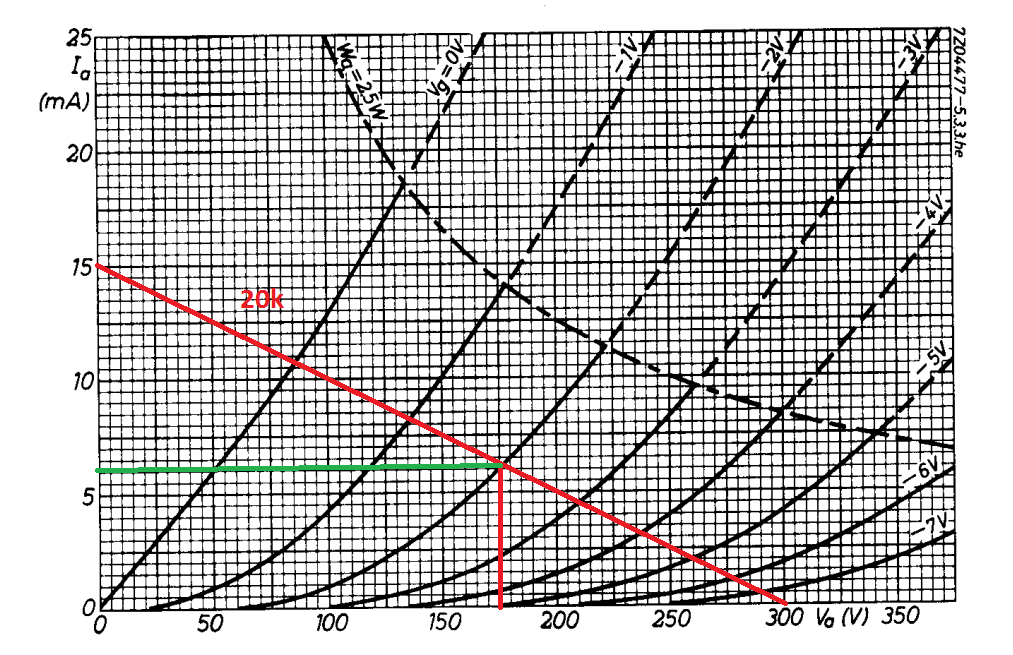
Of course before calculating the RIAA equalization network I needed to set the operating conditions of the two gain stages. Those stages are identical. Both sections are biased at 175V anode voltage, -2V grid, 6mA anode current. This setup gives about 28 of voltage gain using a 20K anode resistor. Here is the bias point:

The total gain of the preamplifier is about 37.9dB. This will give you around 400mV output from a cartridge giving around 5mV of output.

The complete schematic is available for download HERE.

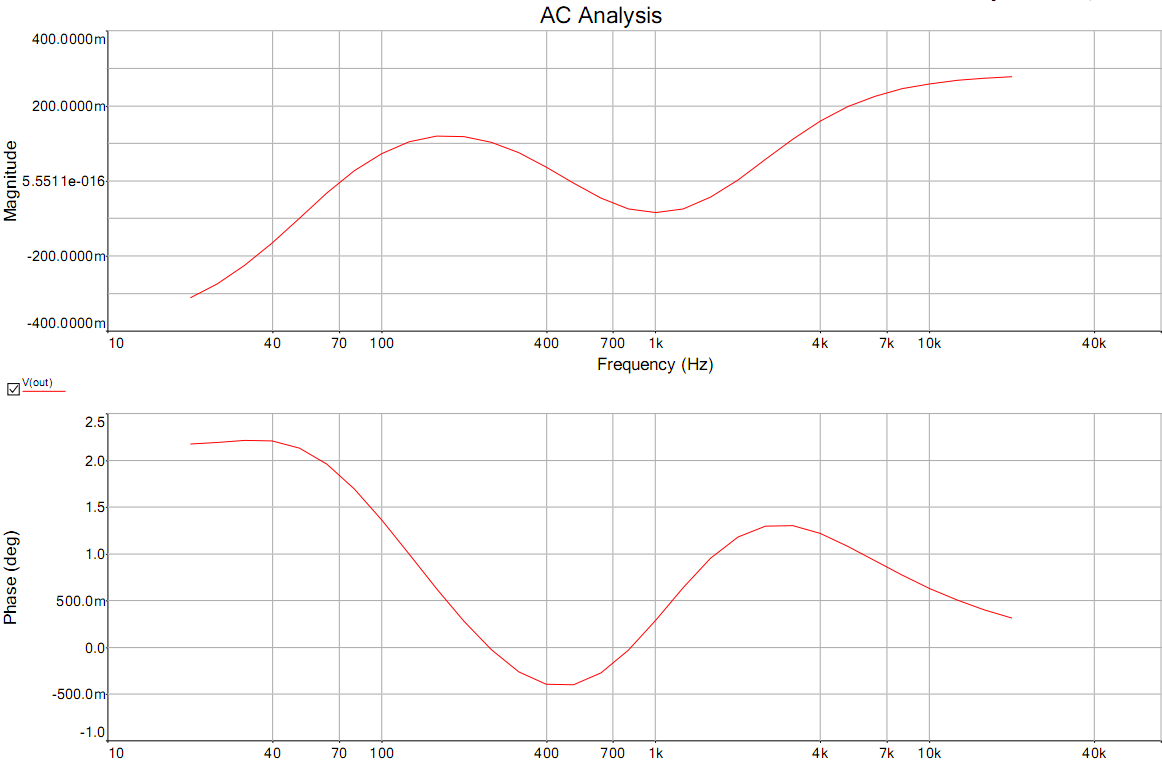
Here is the predicted nonlinearity of the RIAA equalization for this project (+/-0.3dB):

update:

Here are some pictures from a complete project. This one was built by a fellow mate Stoyan Tsonev.

 
THANK YOU FOR READING THIS ARTICLE

DIY USB Isolator Made Easy

Are you into high quality PC audio? Do you have one of these nice USB DAC’s that pull all the good musical stuff out of your computer? Then you might need to check this article out. You can vary well improve your USB DAC performance by isolating it from all the garbage coming from the noisy(electronically) PC.

What I’m about to show in this article is a way to build you own USB isolator and improve your USB audio. The isolator itsel is build around the ADUM4160 chip from Analog Devices. The complete datasheet is here:
http://www.analog.com/en/interface/digital-isolators/adum4160/products/product.html#prod_cross_sell

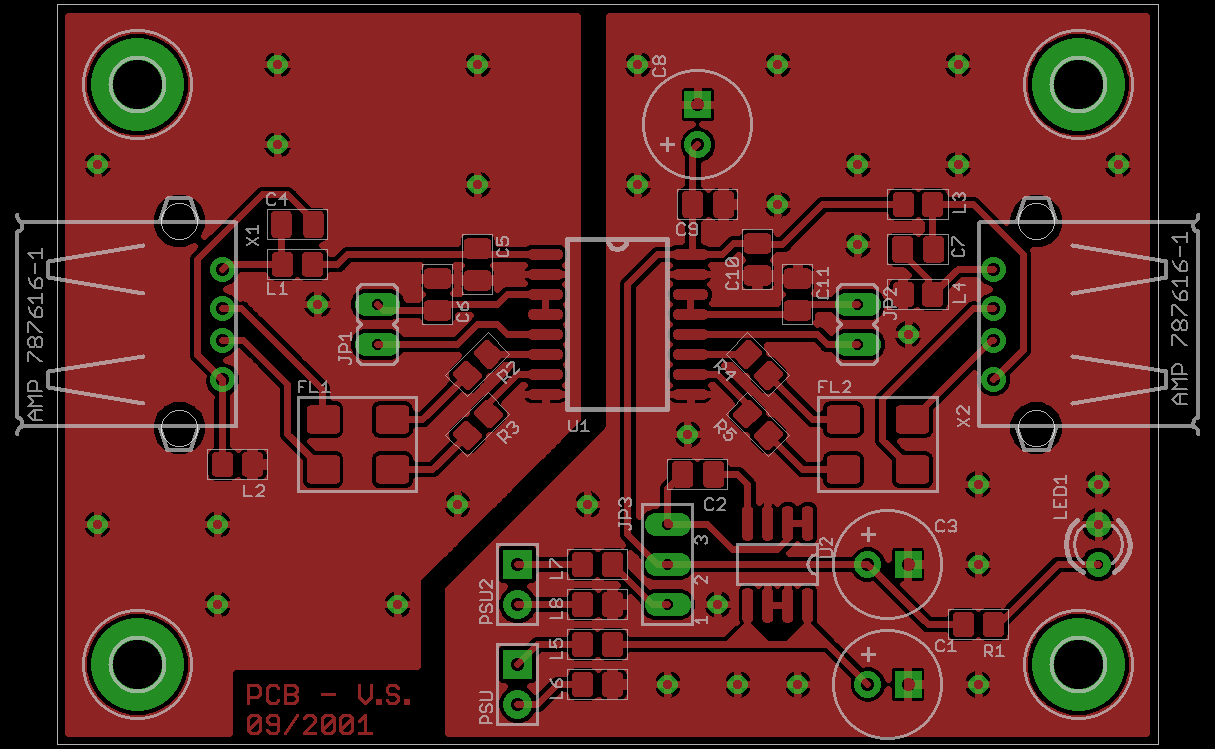
Since the schematic for this project is rather simple, a single layer printed circuit board can be made. Of course a double layer is always better option.

This is how the whole thing looks:

The project also makes use of one high quality LDO regulator. In this case I’m using Linear Technology’s LT1763 fixed voltage (5V). I’ve used this one before in some other projects and I’m quite happy with it. The datasheet is available here:

http://cds.linear.com/docs/Datasheet/1763fg.pdf

The board allows you to use external regulated PSU just in case you don’t trust the LT’s chip. This is the complete schematic for this project:

The circuit is pretty straightforward but here is some explanation. JP1 switches the speed – open=low speed(1.5Mbps), close=full speed(12Mbps).

JP2 function is explained here:
The ADuM4160 has an option to delay application of the upstream pull-up under control of the peripheral. This function is controlled by the PIN input. In this application, the PIN input is jumpered high so that the upstream pull-up is applied as soon as peripheral power is applied. In other applications, it can be connected to a GPIO pin of a controller, a fixed delay circuit can be applied, or it can be connected as shown in this circuit. It is the designer’s choice how to use this functionality.

I personally use id closed. JP3 allows you to switch between the power supplies of the second half of the isolator. I recommend using the build in regulator. In this case the board need 10-15VDC. A simple DC adapter will do the job.

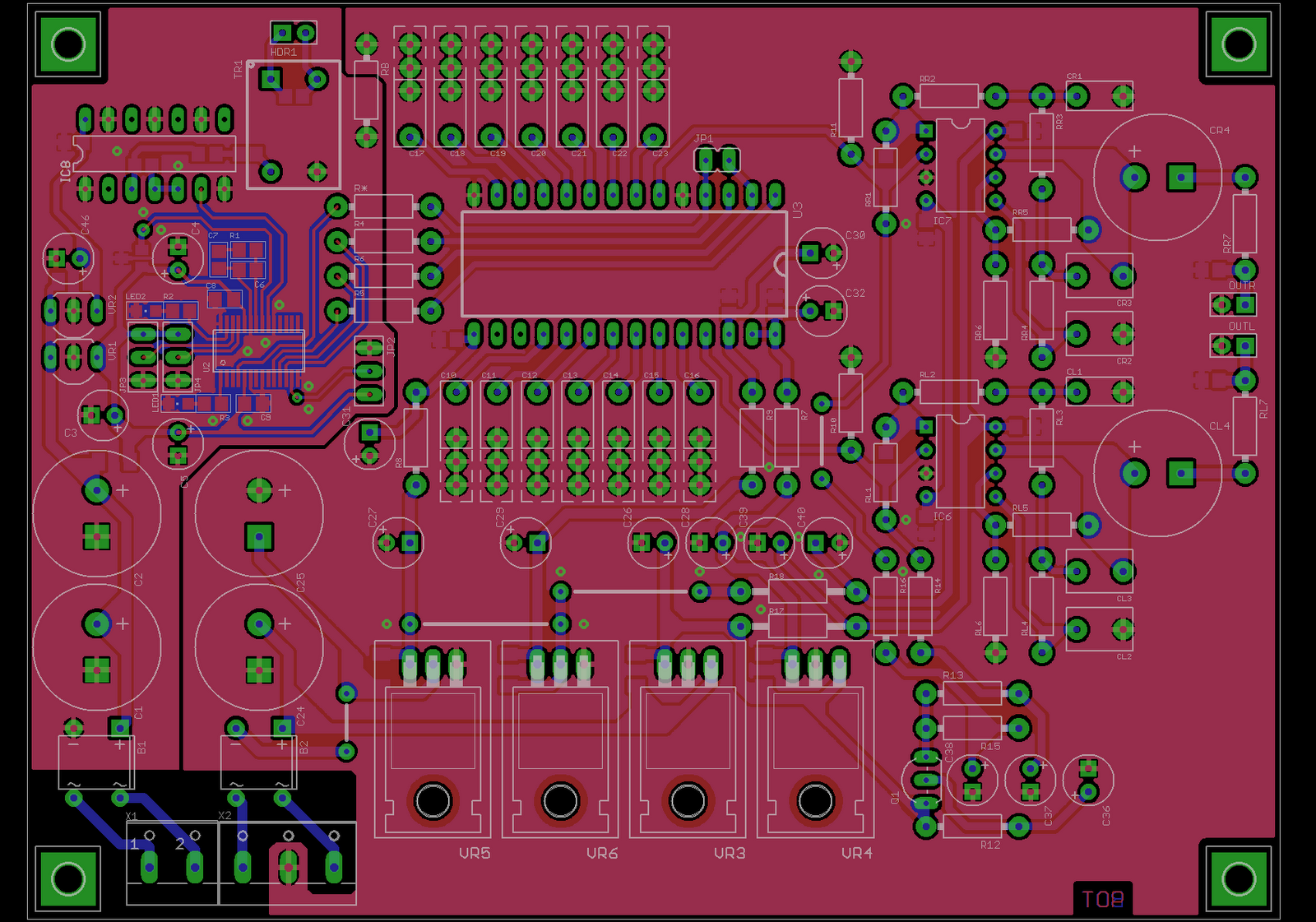
The PCB artwork in 1:1 scale pdf file and component placement is available for download HERE.

The PCB can be easily made using a laser printer and an iron. I encourage you to try this simple upgrade, as you won’t be disappointed.

************THANK YOU FOR READING THIS ARTICLE************

DIR9001+TDA1541A Classic NOS DAC

The whole thing started as a simple idea – to design a simple S/PDIF input DAC for my PC. So I turned to the classical chipset – DIR9001 + TDA1541A in NOS mode. I just wanted to keep thing simple and at low cost(compact PCB). So eventually the thing grew up to a group project with many people sharing opinions on the mater.
The whole discussion thread is here(Bulgarian language):

https://www.bgaudioclub.org/forum/viewtopic.php?t=22012

Since some people suggested to make it possible to use TDA1541(non A) DAC chip the project was altered this way. The interesting thing about TDA1541(non A) is that it allows a master clock to be fed directly to pin 4. This one accepts 11.2896MHz clock frequency. In TDA1541A non such thing is available.

From TDA1541 datasheet:
“A separate system clock input (SCK) is provided for accurate, jitter-free timing of the analogue outputs AOL and AOR.”

So the PCB was designed to allow this mode, should a TDA1541(non A) was used. For some reason Philips had decided to turn that feature off in their later TDA1541A DAC chip. Here is how it should be implemented according to a Philips application note from 1985 :

The application is a bit misleading. The SAA7220 chip actually outputs 11.2896MHz at pin 9.

As for the analog section. It’s of course a pure classic. Opamp based I/V converter, followed by an active low-pass filter. Nothing fancy here. The project uses one double opamp (NE5532) per channel. Of course a DC null correction is used at the DAC chip outputs. Despite that a output coupling capacitor is paced on the PCB.

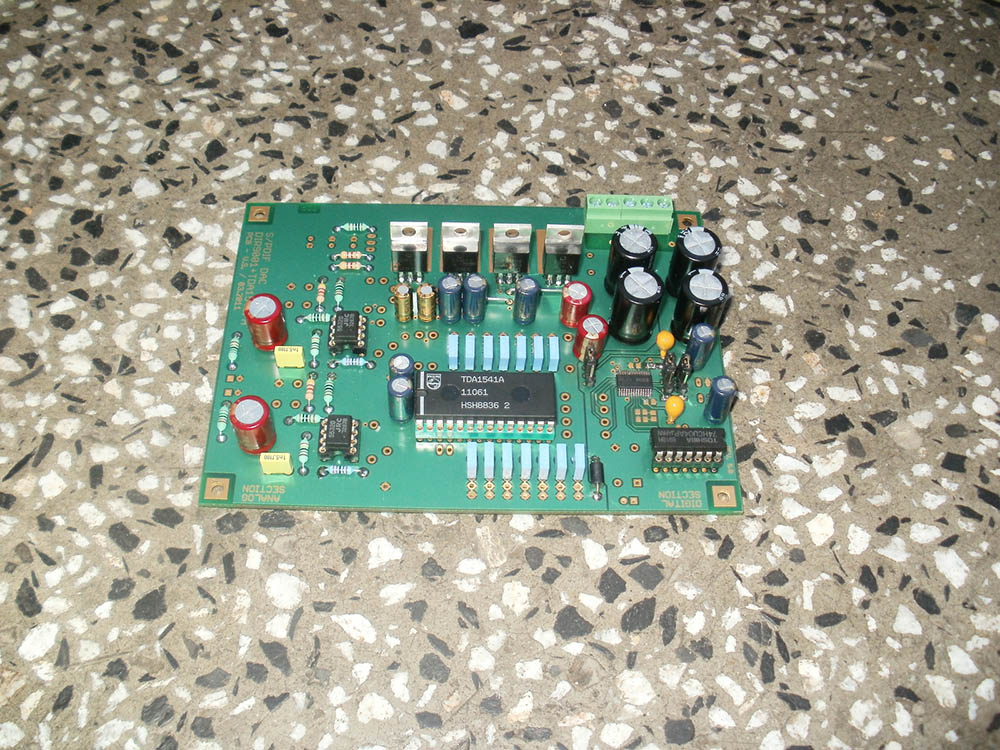
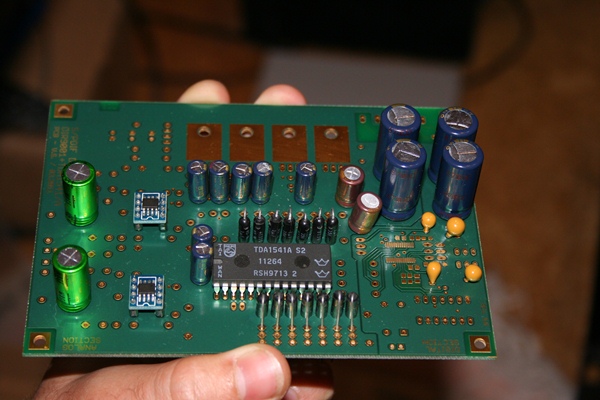
Here are some pictures of the PCB:

Almost completed project forum mate Stanislav
Higher end implementation from forum mate Nikolay Kolev
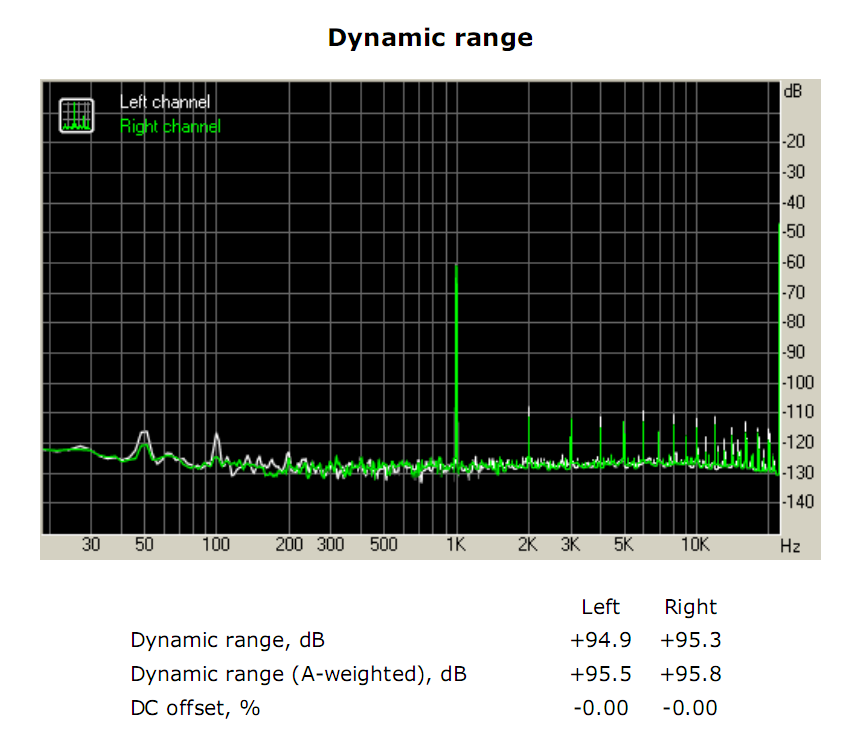
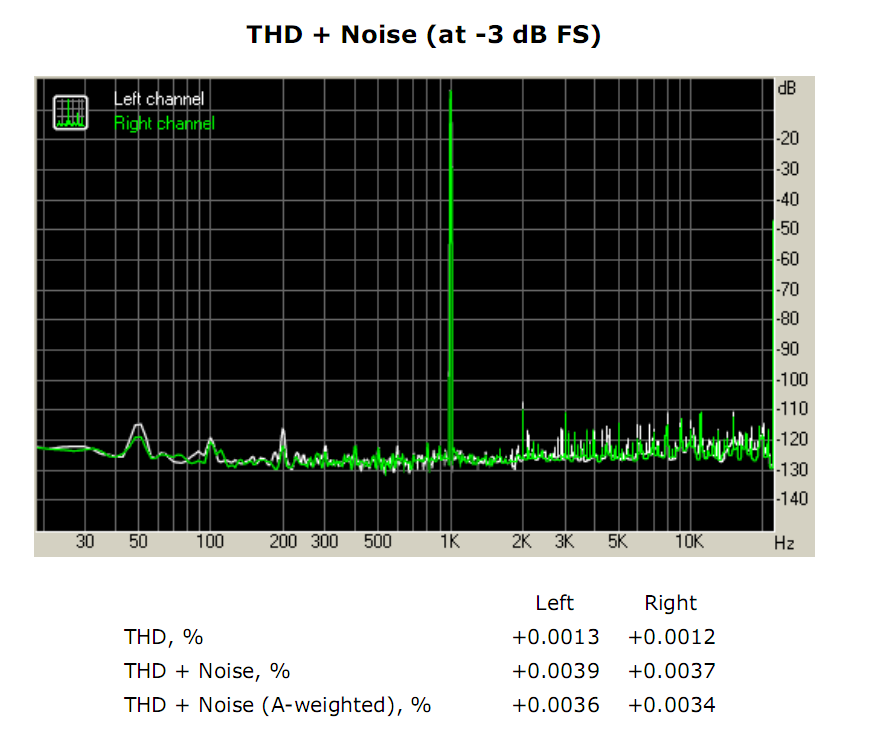
Here is a set of measurements taken by user pid_58 (thnaks mate 😉 ) using EUM 0404 sound card.

The final version of the schematic is available for download HERE.

UPDATE:
I am adding the gerber files for this project. To download click here – >>>[ LINK ]<<<

Update 19.08.2012
The project was further tweaked by a fellow Plamen Todorov by adding a ECC88 tube stage. More info on this HERE

WARNING – this project is provided to the DIY community for free and is intended for personal usage ONLY. Therefore a commercial usage is NOT allowed without author’s exclusive permission!!!

*****************THANK YOU FOR READING THIS ARTICLE*****************

Low Jitter Clock For CD Player – Upgrade Module

Do you have one of those expensive CD players that use a simple quartz oscillator to provide the clock? Anyways, the clock upgrade is no doubt the most important upgrade to any CD player. Otherwise you will never hear that nice smooth analog like sounding from your gear.

What you need is a low phase noise clock source to feed the CD player.
Searching the web will come out with many ways to upgrade your CD player. Some of those upgrades come at substantial costs. Many sources simply don’t provide enough data to prove those high costs in my opinion.

So i searched and searched for a nice clock project to upgrade mu trusty Arcam Alpha 5 CD player. This one was already upgraded with a nice new TDA1541A S1 DAC chip so I was impatient to reveal its true potential.

So finally I came across a nice article about The Flea Clock from Pink Fish Media. An very interesting project indeed. What that project aims at is in reality an ultra low noise PSU to power up a Tent Labs oscillator. So my project was based on that one from PFM forum.

I just had to change some things to fit my personal needs.
First – the oscillator was unable to drive any substantial capacitive loads, so I needed to buffer the outputs. Buffering is an easy task. A simple inverter would do the job. In this project I’m using two 74VCH1G04 ic’s to provide me two outputs.
Second – i wanted a oscillator with real measured parameters showing the phase noise and jitter performance since I had no way(equipment) to measure the jitter myself. Few manufacturers that in My opinion are suitable for the task:

Fox Electronics HC-73 series oscillators:
http://www.foxonline.com/pdfs/FXO_HC73.pdf

EuroQuartz XO-91 series oscillators:
http://www.euroquartz.co.uk/Portals/0/xo91.pdf

Silicon Labs Si510 series oscillators:
http://www.silabs.com/pages/DownloadDoc.aspx?FILEURL=Support%20Documents/TechnicalDocs/si510-11.pdf&src=DocumentationWebPart

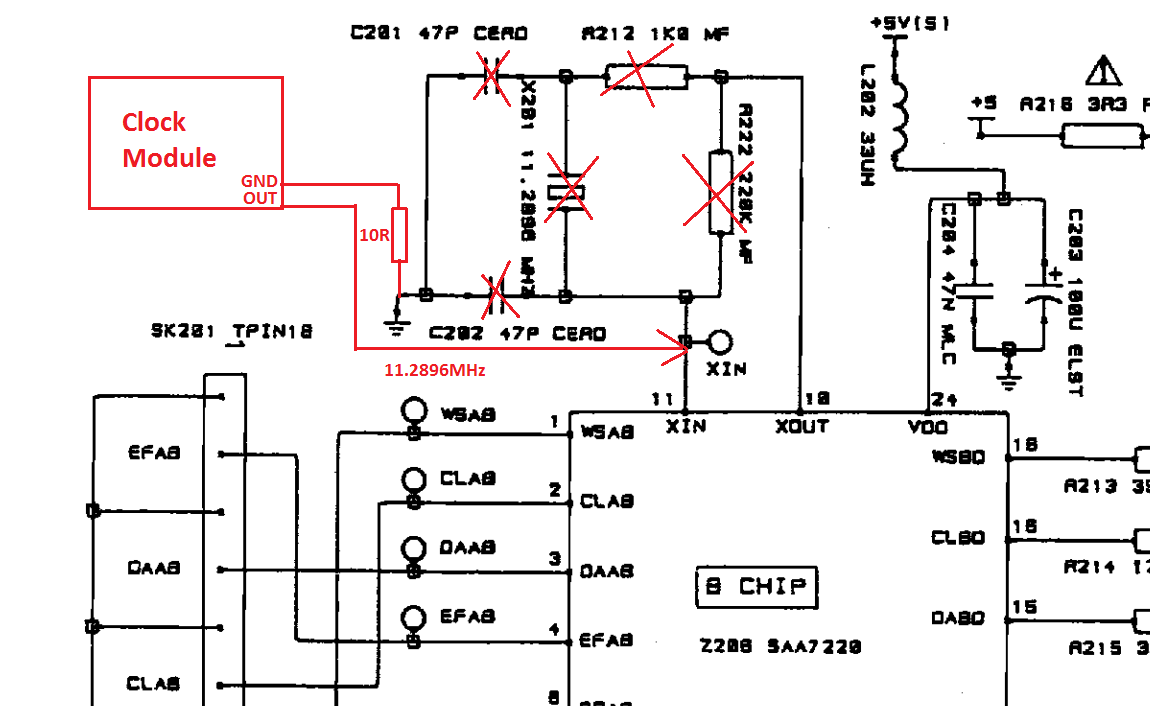
In my case I’m using 11.2896MHz oscillator to feed the digital filter’s XIN pin(pin 11 on SAA7220 chip). This is the most basic way to feed the new clock to your CD player. Simply remove the quartz form the player and the two caps and the resistor. Here is how I did it:

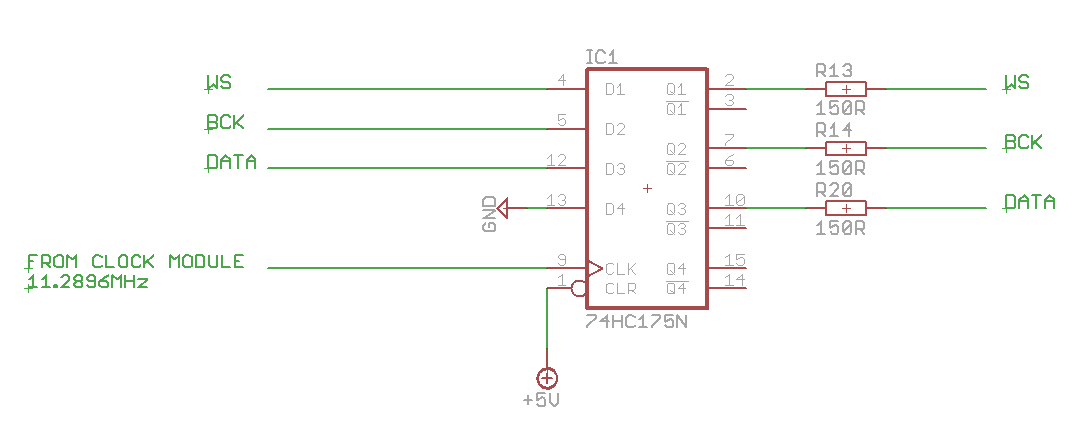
 A more advanced reclocking to your player can done using a flip-flop to reclock the I2S bus before fitting it to the TDA1541A chip. Here is how its done:
This method has one major disadvantage. It uses one IC to process all three wires of the I2S bus. A better way is to use three IC’s but it’s cost and space consuming.
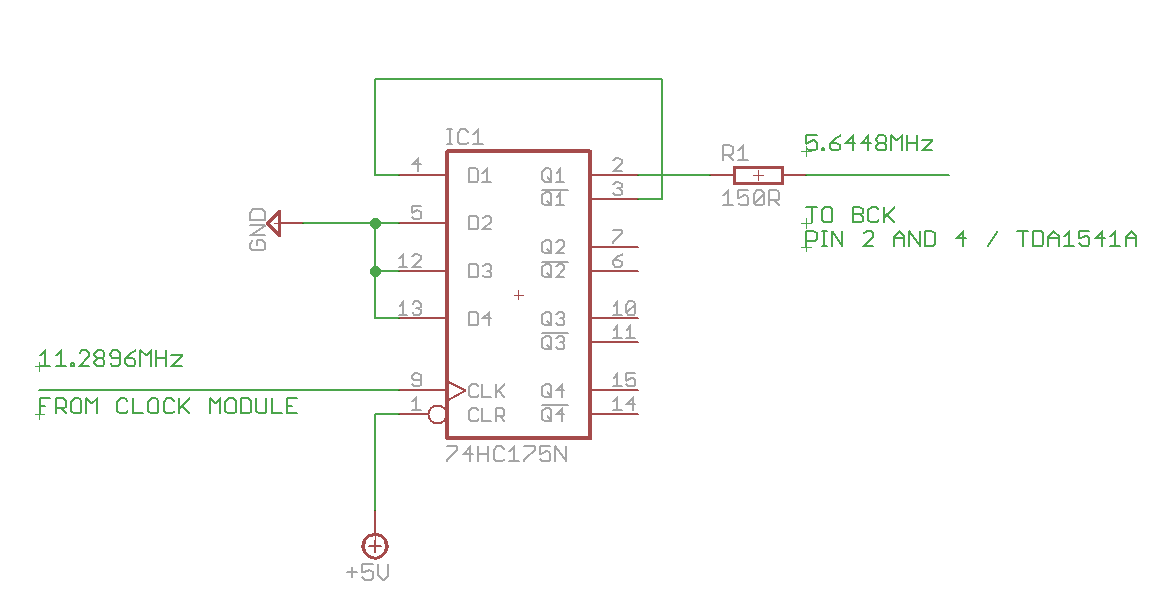
Possibly the best way is to feed the clock separately to the digital filter(SAA7220) and the DAC chip (TDA1541A). The DAC chip itself requires half the frequency provided to the digital filter. So we need to divide the clock coming from the module. This can be done again using a flip-flop:
In my opinion this is the better sounding reclock. Anyways, a wide field for experiments is available.
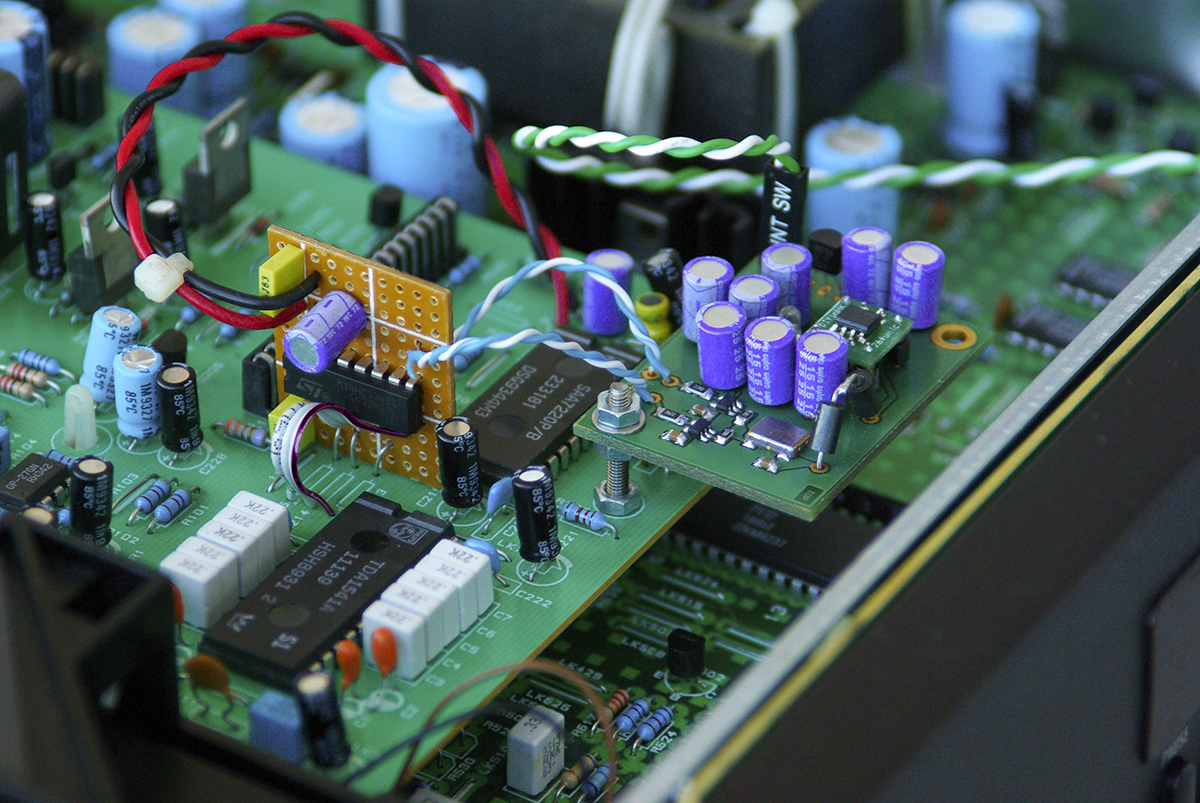
So this is the final result. Here is the clock module PCB fitted into my Arcam Alpha 5 CD player
Ultra low jitter clock fitted into Arcam Alpha 5 CD player
The module itself is powered by a preregulated PSU using a LM317 vreg providing 18VDC. I’m using a small transformer to power the whole thing up. This is the better way to do it. One can still use the already available supply rails from the CD player but 18VDC is the minimum voltage required in order the module to work.
A complete schematic for this module is available HERE.
WARNING – This design is provided to the DIY community for free and is intended for personal use only. Therefore the commercial usage is NOT allowed.
*************THANK YOU FOR READING THIS ARTICLE**************

Page 10 of 11

Powered by WordPress & Theme by Anders Norén

AUDIO WORKSHOP